
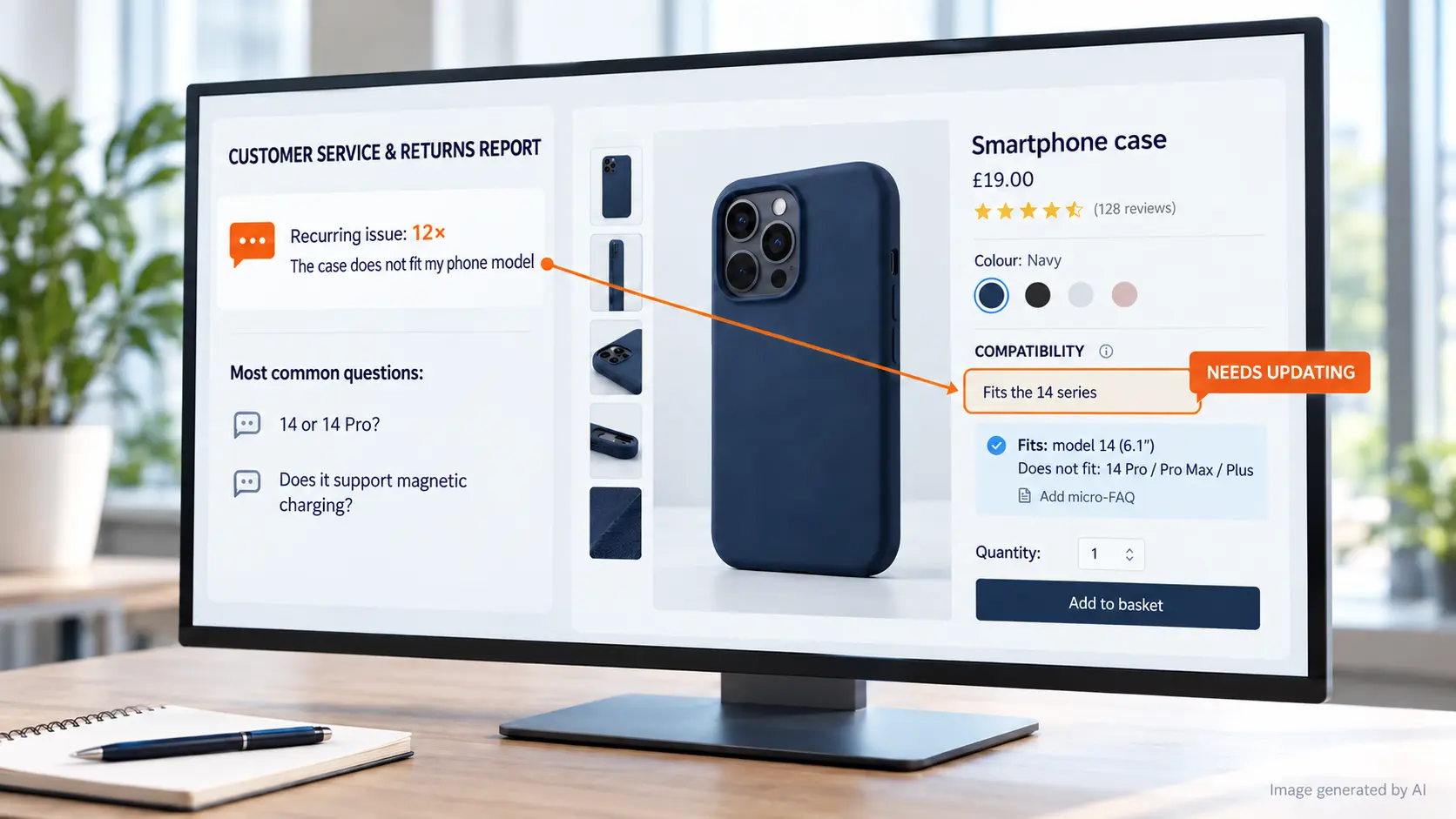
High return rates rarely come from logistics alone. They come from an expectation gap - what customers thought they were buying, versus what your product page actually helped them confirm.
Every return reason and support ticket contains the language customers use when they are stuck. If you capture that language, you can optimise product pages for clearer selection and build SEO content that answers questions earlier in the buying journey.
Below is a practical workflow you can systematise for an e-commerce team, including how to decide what belongs on a product detail page, a category page, an FAQ, or a comparison - and how to make sure the same confusion does not keep returning.
Why Returns Are a Content Problem
Returns are an operational metric, but they point to a deeper cause: customers make choices based on the information they had at the moment they clicked “buy”. If that information was missing, unclear, or buried, you get predictable patterns of returns and repeat questions.
A useful way to think about it for the e-commerce: the “support queue” is often your highest-quality keyword research - because it reflects the exact phrasing customers use when they are trying to confirm fit, compatibility, performance, care, or limits.
Quick insight: If ticket volume spikes around specific product attributes (for example, sizing guidance, technical compatibility, or materials), it is rarely fixed by a generic description rewrite. It usually needs targeted expectation-setting in the exact places buyers make decisions.
How to Mine Ticket and Return Data (Practically)
You do not need a complex data science setup. You need consistent exports, clear categories, and a repeatable way to turn customer wording into page updates.
Step 1: Collect the last 60 to 120 days
- Export support tickets with tags or categories (from tools such as Zendesk, Gorgias, Intercom, or your helpdesk).
- Export return requests with their “reason” fields and any free-text notes.
Step 2: Normalise reasons into themes
Group reasons into themes that map to selection checks, such as:
- Fit and sizing
- Compatibility and requirements
- Materials and feel
- Care, cleaning, maintenance
- Use cases and limitations
Step 3: Use verbatim phrases
Create a worksheet with three columns:
- Customer phrase (verbatim): the exact wording from the ticket or return notes
- Decision they were trying to make: what they were confirming (for example “Is this the right size?”)
- Where it appeared: ticket category and return reason
Step 4: Apply an 80/20 focus
Identify the top 20% of themes that account for roughly 80% of the volume. Those are the best candidates for immediate product page fixes and supporting SEO content.
Privacy safeguard (do this before any analysis): remove or hash personal data (names, email addresses, order IDs that can identify individuals). If you are working with free-text tickets, redact third-party references and any sensitive details so you can safely share summaries internally or with an external content team.
Step 5: Check whether the same confusion persists
Run the same theme grouping on a second time window (for example the previous 60 days). If the top themes do not change, you have a stable “information gap” worth resolving. If they do change, you may be dealing with an ongoing issue like a new batch, a new product variant, or an updated guide that is not being read.
A Signal-to-Location Framework for Better Pages
To keep this actionable for an e-commerce manager, use a single illustrative category example throughout: Apparel - sizing and fit. This category typically generates clear ticket language that can be resolved with structured on-page fixes plus supporting content.
For each repeated return reason or support question, decide what to check with the product team, and where the answer should live. Use this table as your workflow.
| Repeated signal (ticket/return wording) | What must be checked with the product team | Where the answer should go |
|---|---|---|
| “Runs small” / “Is the size chart accurate?” | Actual measurements (garment vs body), how the fit is described, stretch/shrink expectations, and whether sizing guidance differs by fabric type. | Product detail page (expanded sizing section) + FAQ at the bottom of the page. |
| “Will it fit my height/weight?” | Whether you can recommend by body measurements safely, and how to explain fit for different body types without overpromising. | Product FAQ + supporting sizing guide content at category level. |
| “I ordered my usual size and it still didn’t fit” | Common fit outcomes by size range, the most common confusion drivers (length vs waist, sleeve fit, etc.), and any variant-specific differences. | Product page (clarify which measurement matters most) + a short “How to choose the right size” section. |
| “Can I exchange if it doesn’t fit?” | Current returns/exchange policy wording, eligibility, and any exceptions for hygiene or time windows. | Category or checkout-support content + page-level FAQ (keep it accurate and consistent with policy). |
Practical insight: When you push “policy answers” into product pages without updating them from the latest policy, you create a new expectation gap. Keep policy language controlled by the team that owns returns terms, and treat it as a versioned input for content updates.
Practical insight: If the same phrase appears across multiple products, resist writing unique answers from scratch each time. Instead, create one category-level sizing explanation and reference it from each relevant product page (with product-specific measurement callouts).
Product Page Optimisation That Reduces Returns
Once you know the top confusion themes, optimise the product page to reduce uncertainty at the moment of selection. This is not “adding length”. It is structuring expectation-setting so the buyer can self-select correctly.
1) Expand the key description with decision-critical detail
A practical target is 300+ words in the primary description area, but only if the extra lines answer genuine questions raised in tickets.
- Turn ticket phrases into short sub-sections (for example “Sizing - how it fits”).
- Explain what to expect in plain language (garment measurements, stretch, shrink behaviour if relevant).
- Use the same phrasing customers used when they asked for clarity.
2) Fix factual ambiguity
Returns often increase when product pages contain missing or fuzzy details. For apparel sizing, verify:
- Measurements: provide the garment measurements that customers need, and clarify how they were taken.
- Materials: explain fit implications (stretch, recovery, drape) where you can do so accurately.
- Limitations: clarify what your guidance can and cannot predict.
Practical insight: If you cannot confidently answer a question, do not guess in copy. Instead, write a “how to check” explanation (for example, “Compare your favourite garment measurements to these garment measurements”). This reduces support tickets without introducing incorrect claims.
3) Add a knowledge-grounded FAQ at the bottom
A bottom-of-page FAQ catches late-stage “final checks” before purchase and supports self-service. Build FAQs directly from your top ticket themes.
- Sizing FAQ: “How do I choose the right size if I’m between sizes?”
- Fit FAQ: “What does ‘runs small’ mean in measurements?”
- Variant FAQ: “Does sizing differ by fabric type or style?”
Keep answers specific to the product context and aligned with your policy - generic templates tend to miss the exact misunderstanding customers reported.
4) Ensure internal linking supports self-selection
Product pages should link to the right supporting content types, not only to the most popular articles. For example:
- From each product: link to the category sizing guide and the specific measurement explanation.
- From the category: link back to the product attribute filters and “how to choose” content.
This is also how your SEO investment becomes systemic, not isolated.
Build Search-Driven Content Clusters
Product page optimisation reduces uncertainty at checkout. But many return drivers are seeded earlier, when customers search for confirmation like “runs small?”, “how should it fit?”, or “what measurements do you use?”. That is where supporting content clusters help.
Comparison: SEO vs GEO and why it matters here
| Topic | SEO (Google) | GEO (AI-powered search and answers) |
|---|---|---|
| Primary goal | Rank for keyword queries and capture organic traffic | Be discoverable and usable in answer environments |
| How content is interpreted | Indexing, ranking signals, and page relevance | Context extraction and answer-quality matching |
| What to prioritise from ticket data | Exact buyer questions and the supporting sections they need | Clear, grounded explanations that can be reused in responses |
| Where this shows up | Category pages, product pages, guides, comparisons | AI answers, question-and-answer prompts, “which option” selections |
For an apparel sizing cluster, you might create:
- Commercial pages: category pages and product hubs with sizing emphasis and attribute filters.
- Supporting content: a sizing guide that explains how to choose between sizes, plus a “how to measure” page.
- Conversion enablers: “Which size should I choose?” sections, comparison tables between fits, and FAQs.
Practical insight: When writing supporting content, keep one goal per page. For instance, a “How to measure” guide should not also try to teach styling, returns policy, and product history. Otherwise, you risk creating content that answers none of the specific ticket phrases clearly.
Rebell Way’s SEO & GEO Content Growth System is built for exactly this workflow: turning customer questions into structured content that can rank and be used in answer environments, then measuring what improves repeatable commercial outcomes.
Systematise Your E-commerce Content Workflow
Mining tickets is the start. The work that protects margins is turning insights into a repeatable production process - with validation so you do not publish generic, ambiguous, or incorrect content.
Use a workflow that prevents generic output
- Start every brief from real phrases: include the top customer wording and the theme it represents.
- Validate with the right owner: confirm measurements, compatibility rules, and policy wording before publishing.
- Write with the customer’s vocabulary: mirror the phrasing from tickets so the page matches intent.
- QA the expectation check: ensure the page answers the “final checks” that normally trigger contact or returns.
Make testing part of the content lifecycle
Instead of “publish and forget”, plan a simple test loop:
- Measure support ticket volume by theme after the page updates go live.
- Monitor return reason frequency for the same themes.
- Check search performance for the phrases you matched from tickets.
Then roll updates to other products or categories where the same misunderstanding repeats.
Privacy reminder for team workflows: restrict access to raw ticket exports. Share only redacted summaries or aggregated theme outputs with broader teams so personal data stays protected.
If you want a structured way to assess your opportunity before you rewrite, Rebell Way can run an Organic Growth Audit / Website Potential Assessment to identify where content-led growth is most likely to improve organic visibility and support commercial performance.
Explore Rebell Way’s organic growth and content approach
FAQ
How can I identify the most common reasons for e-commerce returns?
Export support tickets and return reasons for the last 60 to 120 days, group them into clear themes, then use an 80/20 focus to prioritise the highest-volume misunderstandings first.
Which customer questions should go on the product page vs. a blog post?
Selection-critical questions (fit, compatibility, requirements, care limits) should go on product pages and FAQs. Learning-oriented questions (how to choose, comparisons, maintenance and troubleshooting) belong in supporting guides or comparison content.
How does improving product descriptions and FAQs affect organic SEO?
Clear, decision-ready content that matches buyer questions improves relevance for both search and AI answer environments, and it often reduces the need for support contact because buyers can self-select with less ambiguity.